
Why Your Phone Storage is Full And the ₹27 Jugaad That Fixes It Forever
There is nothing – and I mean nothing – more frustrating than trying to click a photo and seeing that dreaded message: “Storage Almost Full.”
You panic. You go to your Gallery, delete 5 videos, uninstall that one heavy game you haven’t played in months, and clear your Recent folder. You feel proud. Chalo, kaam ho gaya.
But two days later? The warning is back.
You check your settings and see Instagram taking 6GB and WhatsApp taking 9GB. You are confused. You haven’t saved that many photos or reels. So where is this space going? Is the phone broken?
The answer is Hidden Cache and Digital Corpses.
Your phone is full of invisible kachra (trash) that you can’t see in the Gallery. Today, I’m going to show you how to clean it deeply without losing a single personal photo.
What is “Cache”?
Apps like Instagram, YouTube, and Facebook are terrified of being slow. To make sure you never see a buffering circle, they pre-download images and videos before you even scroll to them.
This is called Cache.
When you scroll through Reels for 10 minutes, Instagram silently downloads hundreds of megabytes of data to your internal storage. Over months, this pile of temporary files grows into gigabytes. It’s basically faltu data sitting there, occupying space for no reason.
You can clean this manually by going to Settings > Apps > Storage > Clear Cache for every single app. But let’s be honest, who has the time to do this for 100 apps one by one? Bohot boring kaam hai.
The Solution: SD Maid (The Best ₹27 You Will Ever Spend)
If you search for “Phone Cleaner” on the Play Store, you will find a thousand apps with rocket icons. Stay away from them. Most of them are fake; they just show ads and kill your battery.
But there is one legendary exception that tech enthusiasts and developers swear by: SD Maid.
Unlike the fake cleaners, SD Maid actually digs into the system directories (root folders) to find the ghost files, empty folders, and the leftover junk from apps you uninstalled years ago.
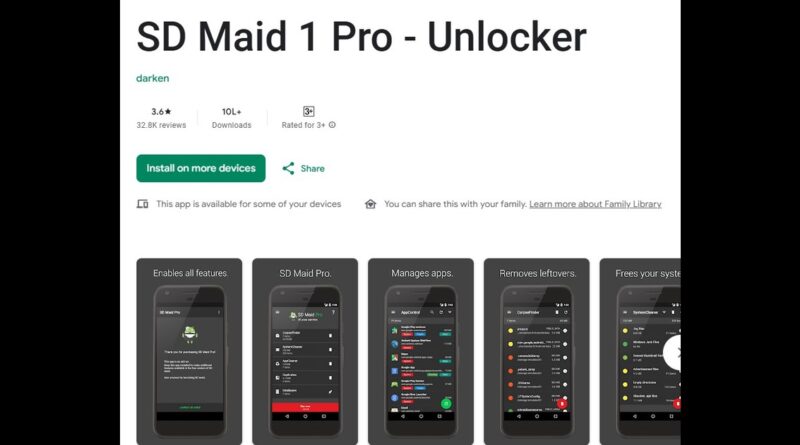
Why You Need the “Pro” Version The free version is decent, but the Pro (Unlocker) is where the magic happens. It unlocks the “AppCleaner” feature which automatically jumps from app to app, clearing the cache for you in seconds.
And the price? It fluctuates, but it usually costs around ₹27 to ₹30 INR. That is literally less than the price of a roadside Dabeli.
How to set it up:
Download the SD Maid 1 or SD Maid 2/SE app (Free) from the Play Store.
Purchase the SD Maid Pro – Unlocker to activate the full features.
Open the app and run these two tools:
CorpseFinder: This finds files left behind by apps you uninstalled ages ago. (These are the “corpses” haunting your storage).
AppCleaner: This wipes the cache from all your installed apps at once.
I recently ran this on my old Galaxy a50s phone and recovered 7 GB of space in just 3 minutes. or kya hi chahiye bro’s
The WhatsApp & The “Sent” Folder
Even the best cleaner apps often skip this next folder because they are scared of deleting your data. But you need to check this manually.
Most people know that WhatsApp saves the photos you receive. But did you know it also creates a hidden copy of every single photo and video you send?
If you forward a “Good Morning” video to 5 family groups, WhatsApp creates a duplicate copy of that video in a hidden folder on your phone storage. These files don’t show up in your Gallery. They just sit there, eating your storage silently.
How to Delete Them:
You need to use the File Manager app (Cx File Explorer or your phone’s default file manager).
Open File Manager.
Navigate to:
Internal Storage > Android > media > com.whatsapp > WhatsApp > Media.Look for the folder named WhatsApp Images.
Inside that, you will see a folder named “Sent”.
Open it. You will be shocked. You will find thousands of memes, screenshots, and videos you sent in 2021.
Select All and Delete.
Darne ki baat nahi hai (Don’t worry). Since these are just duplicate copies of what you sent, deleting them does not remove them from the chat for the other person. It just cleans up your phone.
Do the same for WhatsApp Video > Sent. That is usually where the biggest files are hiding.
Here me out pls
You probably don’t need a new phone with 256GB storage. You just need to take out the digital trash.
Between using SD Maid to wipe the system cache and manually emptying your WhatsApp Sent folder, you can easily reclaim 5GB to 10GB of space today.
So, next time that “Storage Full” notification pops up, don’t delete your memories. Just spend ₹27 and 5 minutes to clean the junk. Trust me, your phone will thank you.